RGB Assets
Stash Wallet lets you view, receive, send, and manage RGB20 tokens. Confirm the correct network and a ready node, and understand the difference between on-chain and Lightning paths.
View Assets
On Home, open Assets
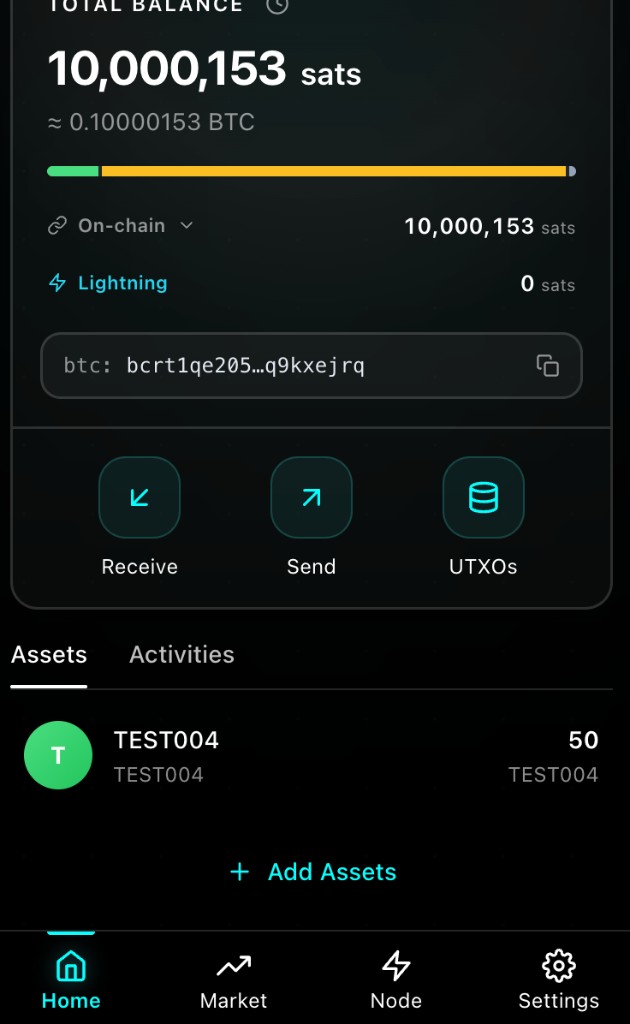
The list shows name, ticker, and balance for added assets
Tap an asset to see contract ID, balance details, and related activity
Asset detail is for checking information. To send, return Home and use Send. Listed balances usually reflect on-chain holdings; amounts held in Lightning channels should also be checked in channel and payment views.
Add Assets
To add a token that is not in your list yet:
In Assets, open Add Assets
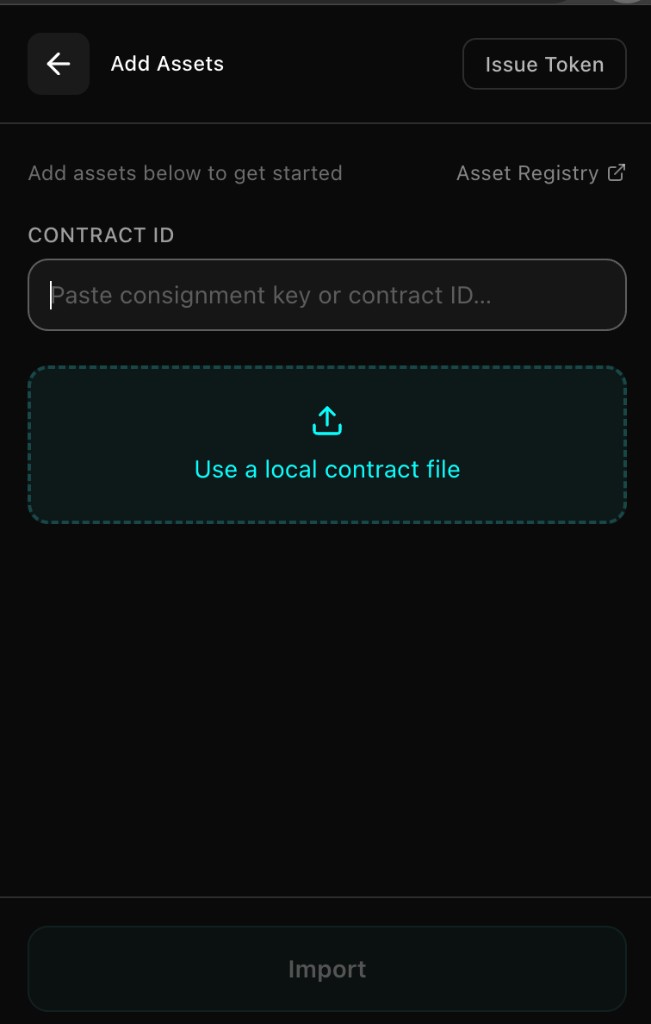
Enter the exact Contract ID
Import the contract as prompted:
- If the wallet can fetch contract data automatically, confirm and import
- Otherwise select and upload the contract file
After a successful import, the asset appears in the list
TIP
Importing a contract identifies the asset. It does not create balance by itself, and it is not the same as claiming a transfer. Obtain Contract IDs and files only from trusted sources.
You may also import an RGB contract from a related Settings entry. Follow the on-screen steps.
Issue a Token (Advanced)
For users with a clear need:
Open Add Assets → Issue Token
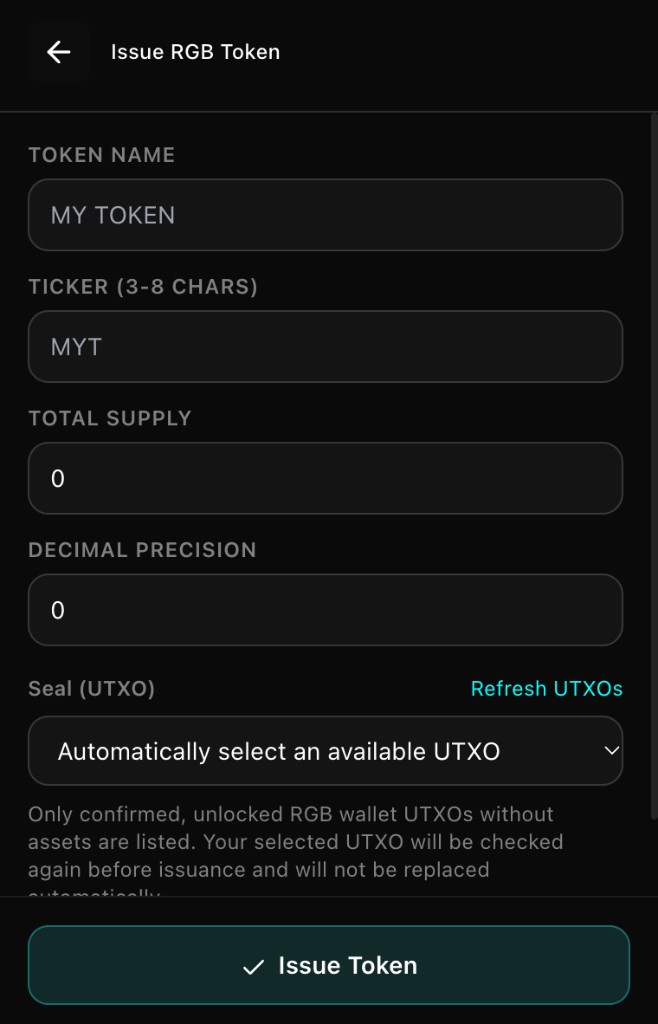
Enter name, ticker, supply, precision, and other fields in the formats the UI requires
Choose an available empty RGB carrier, or use automatic selection
Confirm and submit; save the Contract ID shown on success for later distribution and import
Before issuing, make sure you have enough BTC for related on-chain fees and a usable carrier.
Receive RGB (On-chain)
Import the target asset first and prepare an available RGB carrier (see Manage UTXOs)
On Home, tap Receive, then RGB Onchain Invoice
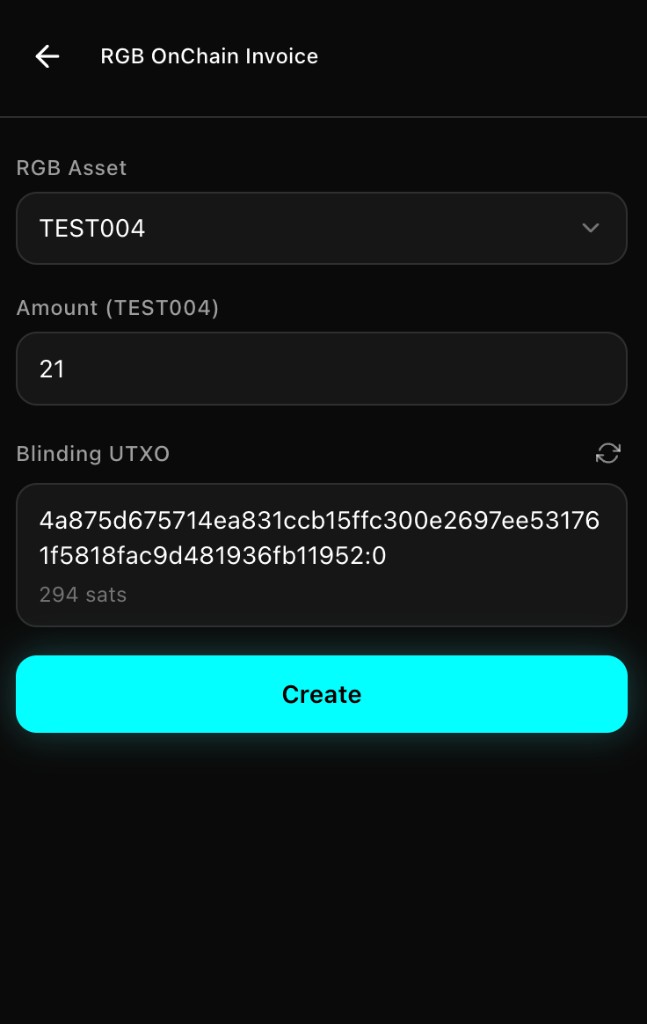
Select the asset and enter the amount (positive integer; interpret with the asset’s precision as shown)
Review blinding/carrier prompts, then generate the invoice
Share the invoice with the payer
Invoices usually expire—complete payment in time. After the payer’s on-chain payment, you still need the asset delivery to be received; when conditions allow, the wallet tries to handle this automatically. If funds do not appear, check that the node is online and unlocked, review asset activity, and avoid creating confusing duplicate invoices.
Send RGB (On-chain)
Ask the recipient for an RGB on-chain invoice (they set the amount when creating it)
On Home, tap Send and paste the invoice
Verify the decoded asset, amount, and fee settings
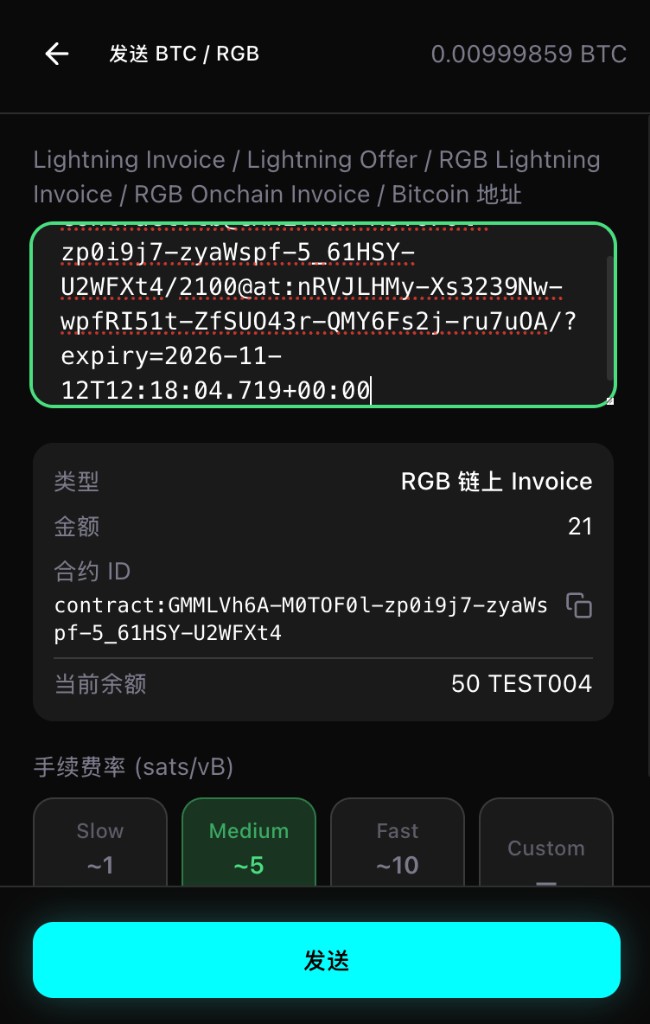
Confirm, then wait for on-chain confirmation and delivery completion
WARNING
The send screen usually does not ask you to enter the amount again. If the amount is wrong, ask the recipient to create a new invoice.
Ensure the asset’s carrier has enough BTC for network fees; having ordinary BTC balance alone may not be enough.
Do not pay your own RGB on-chain invoice to “reorganize” assets. If the result is unknown, check activity and balances first to avoid losses from a duplicate send.
RGB over Lightning
When both sides have suitable channels, you can also use Lightning invoices for RGB:
- Receive: Receive → RGB Lightning Invoice, choose asset and amount, then share
- Send: Send → paste an RGB Lightning invoice and confirm
Lightning is often faster, but success still depends on usable channels, sufficient capacity in the right direction, and final payment completion. See Lightning.
Trade via Market / RGB Dex
Use Market in the bottom navigation, or open RGB Dex on desktop, to view markets, join projects, or perform swap-related actions:
- Connect or open the wallet, then open Market / the relevant site page
- Complete mint, bid, or trade confirmation based on what the page allows
- Return to the wallet, refresh, and verify assets and balances
Viewing a market does not mean every token can be bought or sold inside the wallet right now. Project rules and stages follow the project page. For Fair Mint, new projects typically use full fair minting; existing projects may keep the rules from when they were created.
Notes
- On-chain RGB actions often involve a Bitcoin on-chain transaction and miner fees
- On-chain balance and in-channel balance are used differently—confirm which path you are using
- Refresh assets and UTXO status before important actions
- This guide covers common RGB20 (fungible token) flows
Next Steps
Continue with Lightning.