Regtest Faucet
Before you try on-chain send/receive, UTXOs, or RGB carriers on Regtest, the wallet needs a small amount of test BTC. The official Stash Wallet page provides a Regtest Faucet: connect an unlocked Chrome extension, then claim 0.1 BTC in one click (regtest test coins only—no real value).
WARNING
The faucet is Regtest-only and currently targets the Chrome extension. There is no faucet on Testnet / Mainnet, and Android / iOS do not use this flow yet.
Prerequisites
- Install and pin the Stash Wallet Chrome extension per the Installation guide
- Create or import a wallet and back up the mnemonic
- Switch the wallet network to Regtest (see Settings & Security)
- Keep the extension unlocked; if it just cold-started, open the extension once, then return to the website
Claim steps
Open https://stashlabs.io/stash-wallet/ in the browser
Find the REGTEST FAUCET section on the page
Click Connect Stash Wallet
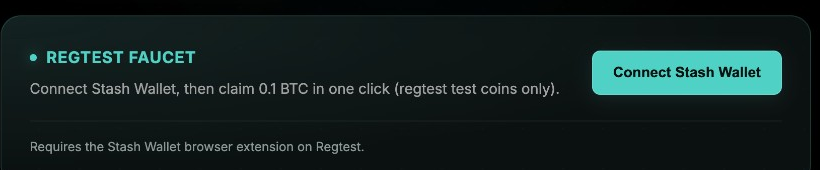
In the extension confirmation dialog, verify the site URL, then approve
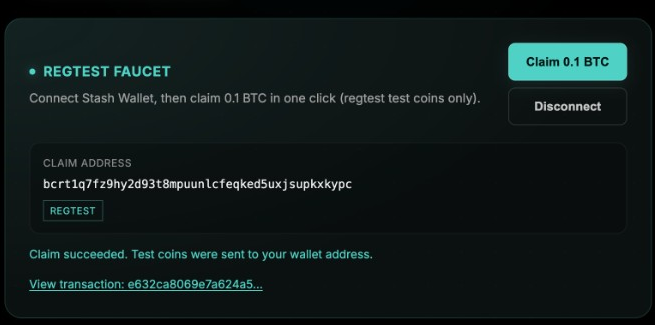
After a successful connection, the page shows your Claim address and a REGTEST badge; confirm the address, then click Claim 0.1 BTC
When the success message appears, use View transaction to check the TXID in the block explorer; return to the wallet and refresh the balance or activity list
TIP
The payout is fixed at 0.1 BTC by the server. The page never asks you for an amount. Trust the on-chain credit and wallet balance—not a client-side calculation.
The Regtest cluster usually mines blocks automatically. If the broadcast succeeds but the balance is briefly unchanged, wait and refresh. If funds do not appear for a long time, verify the TXID from the page in the explorer and confirm the wallet is still on Regtest.
Troubleshooting
| Situation | What to try |
|---|---|
| Wallet not detected / connect failed | Confirm the extension is installed and unlocked, refresh the site, then retry |
| Asked to switch to Regtest | Switch to Regtest in wallet settings, disconnect, reconnect, then claim again |
| You rejected the connection in the extension | Click Connect Stash Wallet again and approve in the extension |
| Claim limit reached | Each wallet address or IP may claim up to 3 times per rolling window (about 1 hour by default); wait as prompted |
| Daily budget exhausted | The public faucet has a daily total budget; wait for the UTC-day reset |
| Claim failed or service unavailable | Retry later; if it keeps failing, copy a receive address from the wallet and ask another funded Regtest test wallet for a small amount |
Notes
- Test coins have no real value—do not confuse them with mainnet assets
- Use only the official stashlabs.io faucet entry; never connect your wallet or paste a mnemonic on unfamiliar sites
- A successful claim does not mean the node is ready; confirm the Node is available before Lightning or some RGB flows
- To inspect the receive address only, open Send & Receive BTC in the wallet; the website faucet reads the current Regtest address after connect, so you do not paste it manually
Next Steps
After you have test coins, continue with Send & Receive BTC, or prepare an RGB carrier.